
Selling consultations online starts with a specific promise: what will you help your client with in a single meeting? The calendar, payments and reminders are there to make delivering that service easier. Below, you’ll go from an idea for your offer to a page where your client picks a time.
The examples are about one-to-one consultations in heyhey. The names, prices and situations shown are examples only, not market rates or a promise of income.
1. Sell a specific outcome, not just time
“One hour of consultation” tells people about time, but little about the benefit. A better description helps someone who is interested decide whether the meeting is right for them.
Instead of “Marketing consultation”, you could offer “Course offer review (60 minutes)”. Add that during the meeting you’ll go through the audience, the scope of the offer and the next steps, and that the client will send you their website address before the call.
Answer four questions in the description:
- Who is this meeting for?
- What topic can you cover in the time available?
- What should the client prepare?
- What does the consultation not include?
Don’t promise a result you don’t control, such as a certain number of sales. Describe the work you’ll do together and the materials you’ll actually deliver.
2. Keep the free call separate from the paid service
A free intro call can help you understand what someone needs. A paid consultation is a service with a defined scope. It’s worth giving them different names and lengths, so the client doesn’t expect a full consultation during a short getting-to-know-you call.
| Example offer | Purpose | What to prepare |
|---|---|---|
| Intro call, 20 minutes | Check whether you can help | A short description of the situation and a question about needs |
| One-to-one consultation, 60 minutes | Work through one specific problem | The scope of the meeting, the price and the materials needed before the call |
In heyhey, you set a consultation as free or paid. A paid booking uses a one-off price. A consultation is a product and counts towards your plan’s product limit: two different consultation offers are two products, not two free add-ons to a course.
3. Count all your working time, not just the call
When you set the price, add your preparation and any summary you write afterwards. For example, a one-hour call with 15 minutes of preparation and 15 minutes for notes takes 90 minutes in total.
In this example, a price of AED 300 works out at AED 200 per hour of total work before costs, taxes and payment provider fees. It shows a way of calculating, not a recommended price for the service. Account separately for admin time and the costs of running your business.
heyhey takes 0% commission on your sales. The payment provider charges its own fees. Check them when you choose how to accept payments, and show the client a clear price before they buy.
4. Set availability you can actually keep
You don’t have to open up your whole week. If consultations sit alongside a course or project work, start with two fixed blocks a week.
In the heyhey calendar, you set shared working hours, and a chosen consultation can use its own separate schedule. A one-off trip is handled with a date exception or blocked time. Confirmed meetings don’t disappear just because you change your availability hours.
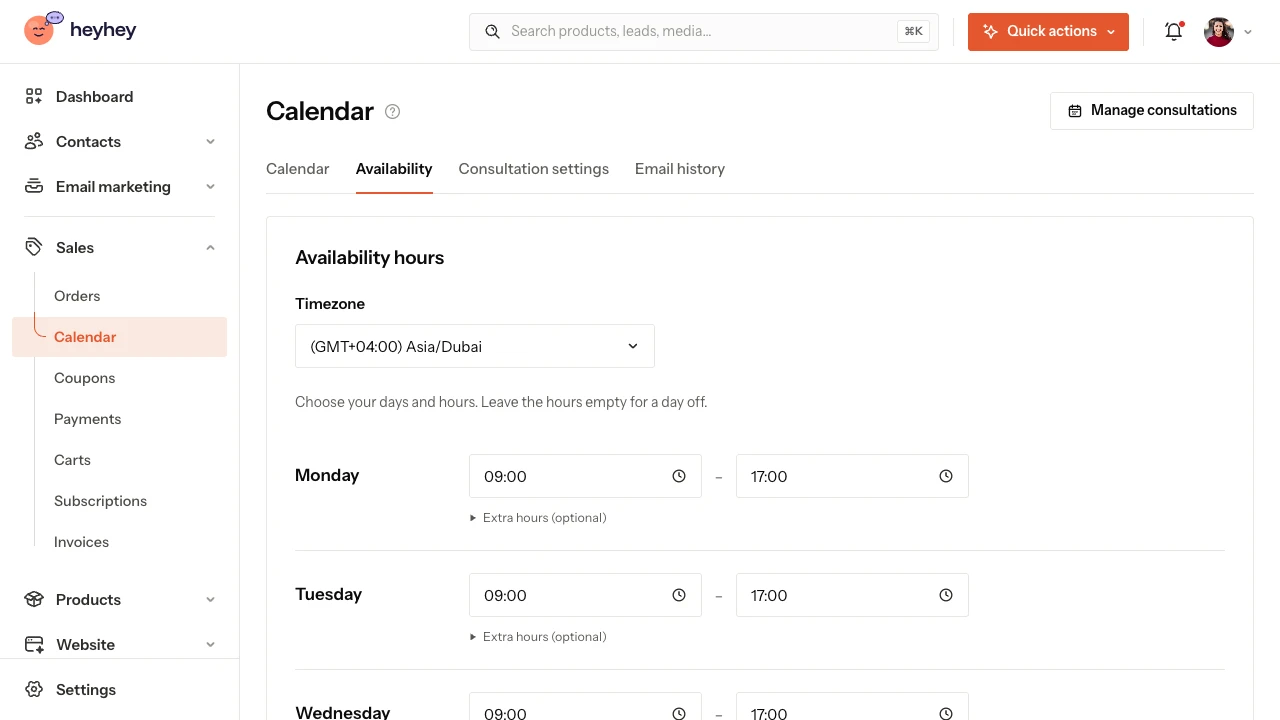
Before you share the link, also decide:
- How much time do you need to prepare before the earliest possible booking?
- Should there be a break between calls?
- Until when can the client change or cancel the booking themselves?
If you hold meetings outside heyhey, add them as blocked time. At the moment, they aren’t pulled in automatically from other calendars. See the availability guide.
5. Prepare the meeting place and a short form
For an online meeting, paste your own call link. heyhey passes the details to the client; it doesn’t create a video room automatically. For a phone call, explain who calls whom, and for an in-person meeting, give the address.
The form shouldn’t feel like extra homework. One well-chosen question can tell you more than ten required fields. “What would you like to discuss?” or “What outcome would help you most?” is a good start.
Don’t ask in the form for passwords, payment details or information you don’t need for the consultation. Test the form on your phone, because a large share of your social media audience may book from there.
6. Give people a short path to a booking
You have several ways to share your offer:
- Public booking link: in a message, on your profile or on a button on a page you already have.
- Quick Page: the consultation sits in your product catalogue, with the calendar right on its product subpage.
- Website: a block that presents the consultation, with a button that leads to the booking.
- Email: a product card or a button with the public link. The recipient picks a time in their browser, not inside the email itself.
Copy the address from the consultation’s sharing section. A link to your private dashboard or to your own preview isn’t the right address for a client. Sharing guide.
7. Take care of what happens after the booking
Turn on the reminders you need and read the message preview. The client should understand where the meeting takes place and how to manage the booking. You set your own notifications separately from the messages the client receives.
The most important point with paid consultations: cancelling a booking is not an automatic refund. In heyhey, cancelling makes the time slot available again. You handle any refund separately, in line with what you agreed with the client and the rules that apply. Don’t promise a process in your offer that you haven’t set up.
Emails and reminders · Rescheduling and cancelling bookings.
Checklist before you share it for the first time
- The description says clearly who you help and with what.
- The price and length match the offer.
- The call link or contact instructions work.
- The public calendar shows the right hours and time zone.
- Payments are set up for the paid consultation, and you’ve tested the whole purchase yourself.
- The form, messages and rescheduling rules are clear to the client.
- You know where you’ll see the booking and the email history.
On Starter, you can begin with one consultation as your one product. When you want to add more consultations, a course or an ebook, check the limits of a higher plan.
See the heyhey calendar, create your first consultation step by step or compare plans.
Compare the options
If you’re choosing a tool, read heyhey or Calendly?. The comparison explains the differences in calendars, fees and how meetings are organised.
![heyhey vs Calendly: consultations, calendar and sales [2026]](https://heyhey.ae/blog-covers/heyhey-vs-calendly-en.webp?v=1790322283)
![heyhey for beginners: why it’s a good first choice [2026]](https://heyhey.ae/blog-covers/heyhey-for-beginners.webp?v=1790322283)
